Configuration
All settings are stored in NVS (Non-Volatile Storage) and survive firmware and filesystem updates. Configure via the web UI (Settings) or the REST API.
Settings pages
Settings has six tabs. Changes are kept until you Save; a tab with a problem shows a red dot, and settings that only take effect after a restart ask for one when you save.
Some settings only work when something else is on - MQTT alerts need MQTT, rain alerts need the rain sensor, night-only alerts need your location. Such a setting can't be switched on while what it needs is off, and if you switch the other thing off later the setting is kept exactly as it was but marked Inactive with the reason and a button that takes you to the fix. The device doesn't act on it until then, and nothing has to be set up again when you switch the other thing back on. Before you save, a note lists anything the change would make inactive. Every such setting is listed in Settings dependencies.
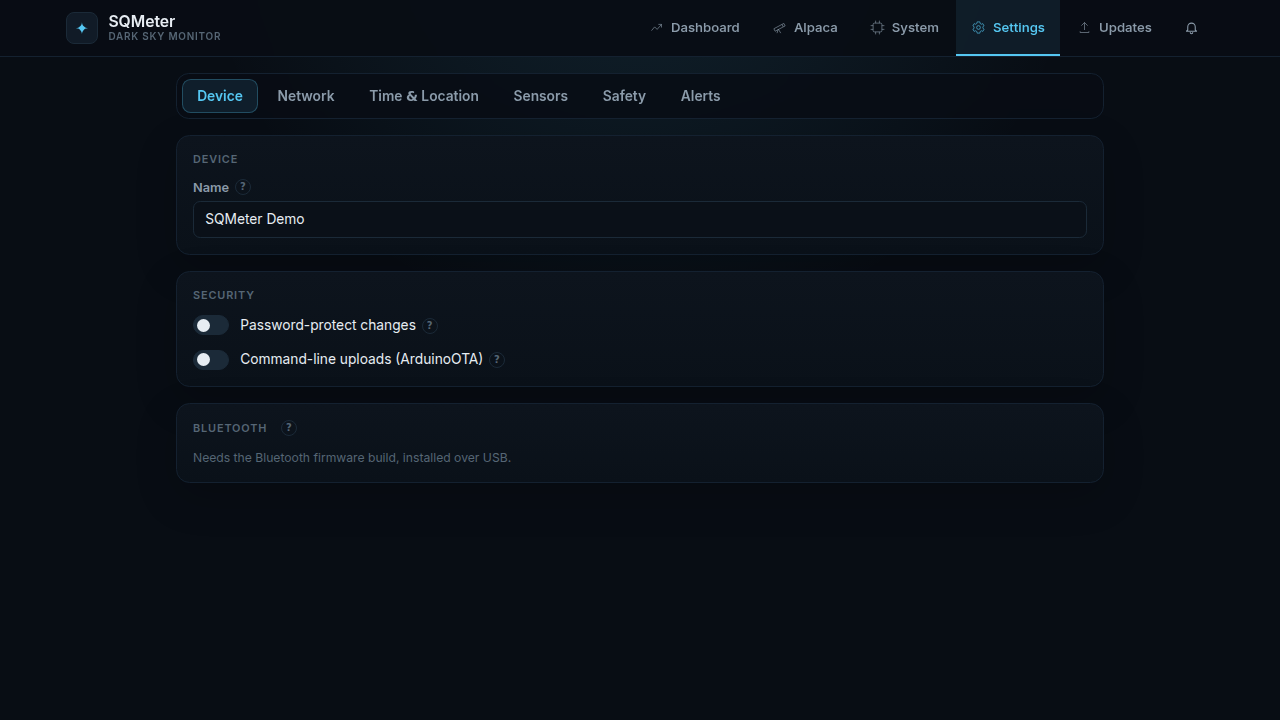
Name, language, password protection, password sharing, command-line uploads (ArduinoOTA), Bluetooth, the OLED display, the battery, backup and restore.
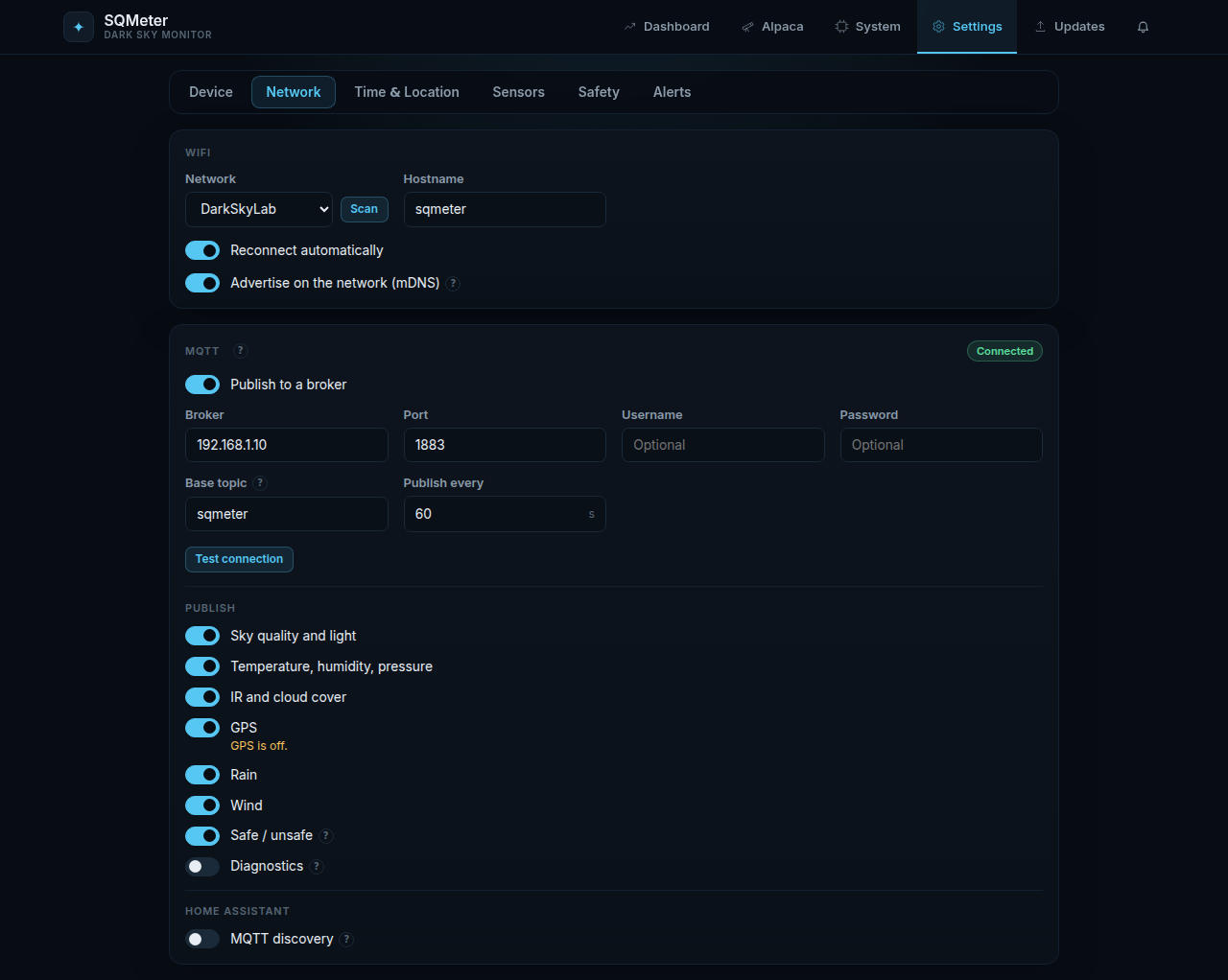
WiFi, mDNS, and MQTT including what's published and Home Assistant discovery - see MQTT.
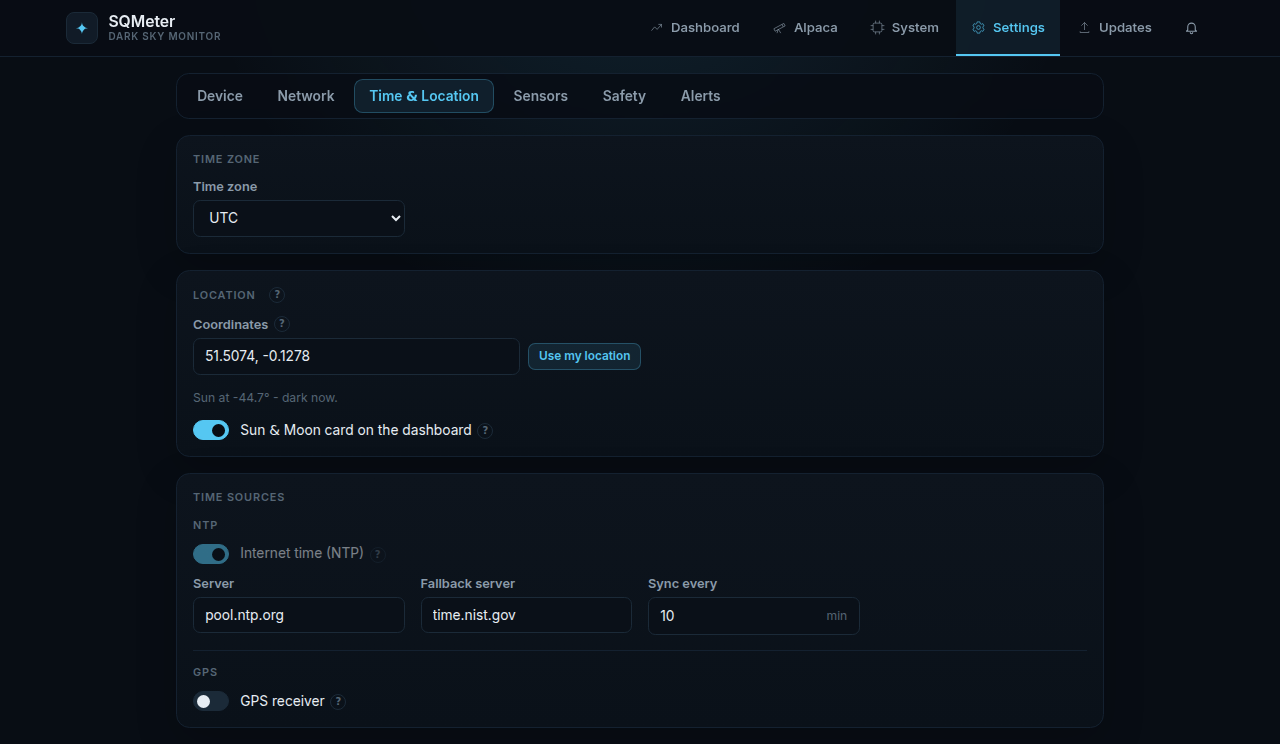
NTP and GPS time, time zone, and the location used for darkness and Sun & Moon.
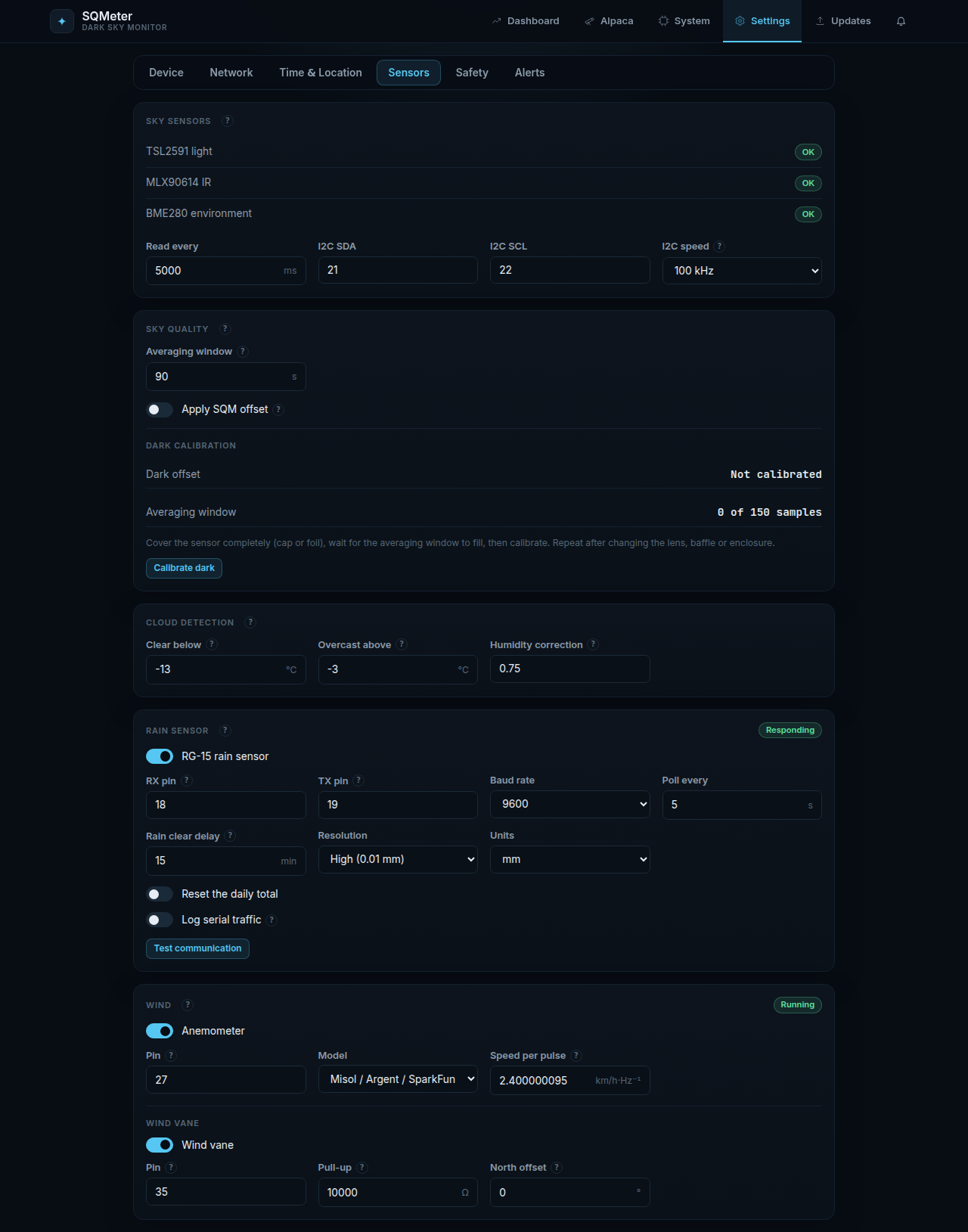
I2C, sky quality (averaging, SQM offset, dark calibration), cloud detection, the RG-15 rain sensor and the anemometer.
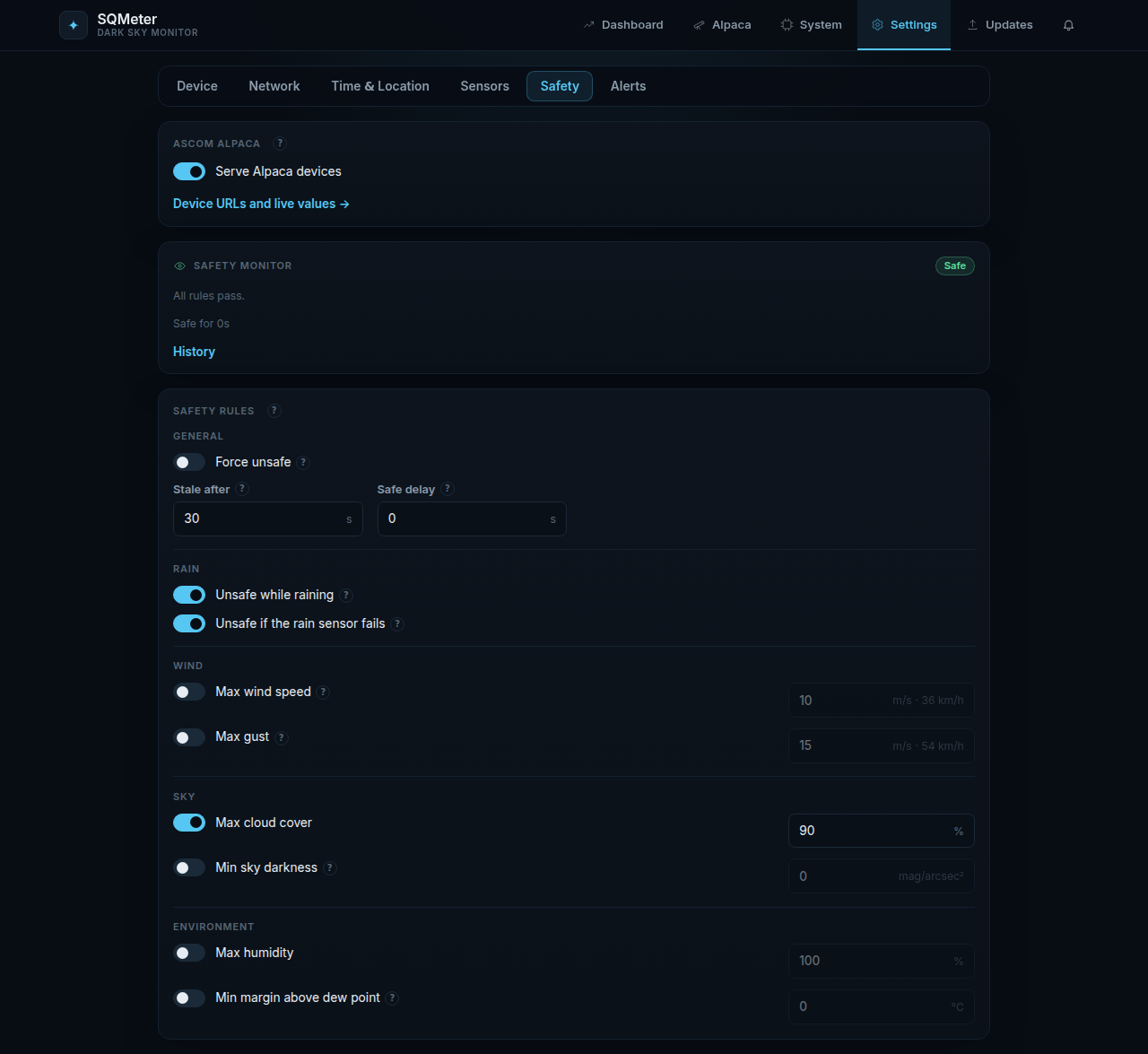
ASCOM Alpaca and the safety rules - see ASCOM Alpaca.
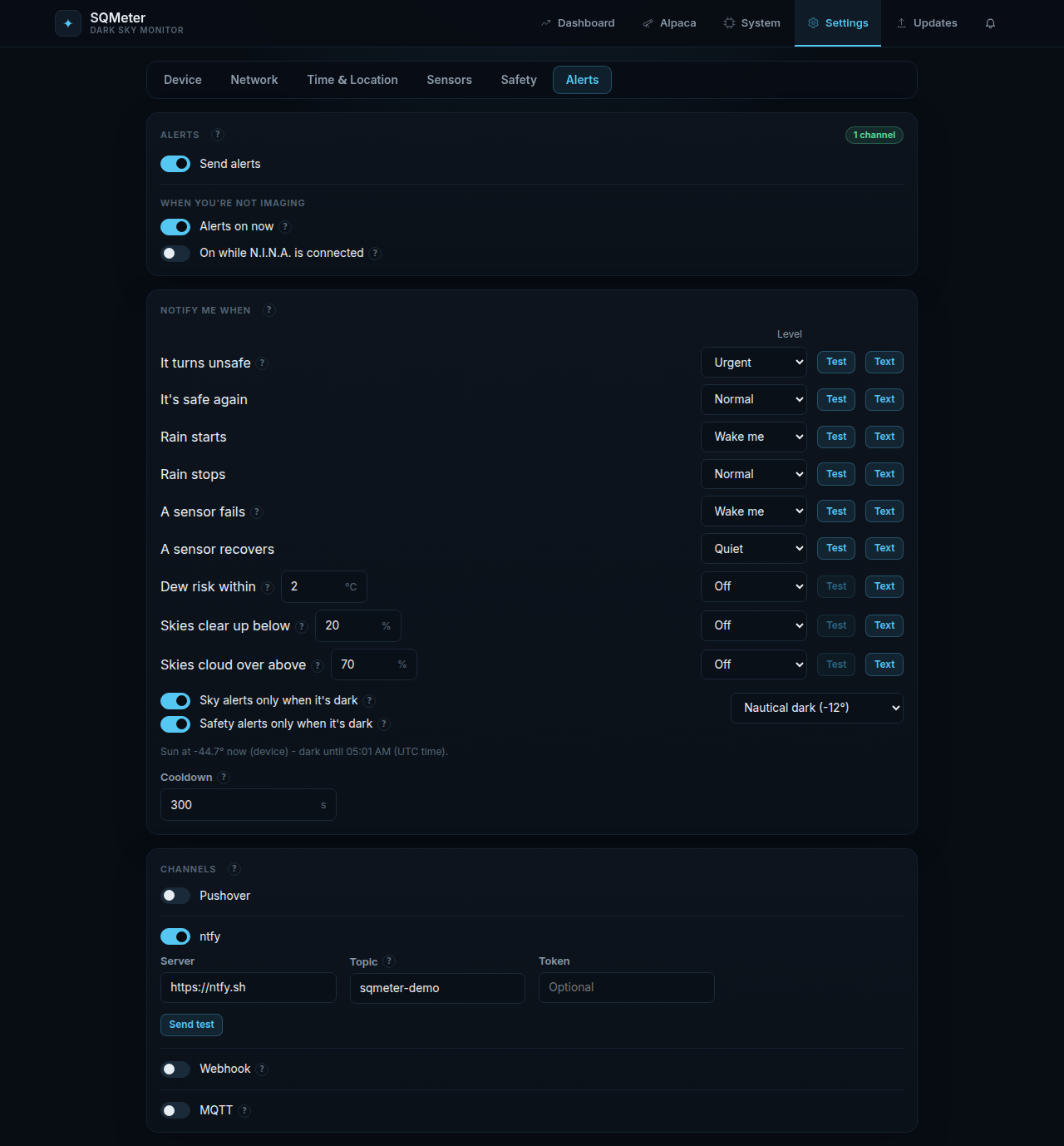
Events, levels, wording and channels - see Alerts.
Full Configuration Reference
{
  "deviceName": "SQM-ESP32",
  "language": "en",
  "primaryTimeSource": 0,
  "secondaryTimeSource": 1,

  "wifi": {
    "ssid": "YourWiFiSSID",
    "password": "YourWiFiPassword",
    "hostname": "sqmeter",
    "mdns": true,
    "ipv6": true,
    "autoReconnect": true,
    "reconnectDelayMs": 1000,
    "maxReconnectDelayMs": 300000
  },

  "ntp": {
    "enabled": true,
    "server1": "pool.ntp.org",
    "server2": "time.nist.gov",
    "timezone": "UTC0",
    "syncIntervalMs": 600000
  },

  "gps": {
    "enabled": false,
    "rxPin": 17,
    "txPin": 16,
    "baudRate": 9600
  },

  "mqtt": {
    "enabled": false,
    "broker": "mqtt.example.com",
    "port": 1883,
    "username": "",
    "password": "",
    "topic": "sqmeter",
    "publishIntervalMs": 60000,
    "publish": { "sky": true, "environment": true, "clouds": true, "gps": true, "rain": true, "wind": true, "battery": true, "safety": true, "diagnostics": false },
    "homeAssistant": { "enabled": false, "discoveryPrefix": "homeassistant" }
  },

  "ota": {
    "enabled": false,
    "password": ""
  },

  "auth": {
    "enabled": false,
    "username": "admin",
    "password": ""
  },

  "sharing": {
    "secrets": false
  },

  "rain": {
    "enabled": false,
    "rxPin": 18,
    "txPin": 19,
    "baudRate": 9600,
    "debugUart": false,
    "mode": "polling",
    "resolution": "high",
    "units": "metric",
    "pollIntervalMs": 5000,
    "rainClearDelayMs": 900000,
    "dailyResetEnabled": false,
    "dailyResetHour": 0,
    "dailyResetMinute": 0
  },

  "sensor": {
    "readIntervalMs": 5000,
    "i2cSDA": 21,
    "i2cSCL": 22,
    "i2cFrequency": 100000,
    "i2c2SDA": 255,
    "i2c2SCL": 255
  },

  "sky": {
    "sqmEnabled": true,
    "sqmlEnabled": false,
    "authoritative": "sqm",
    "showOther": true
  },

  "skyAveraging": {
    "windowSeconds": 90
  },

  "skyCalibration": {
    "enabled": false,
    "sqmOffset": 0,
    "darkVisibleOffset": 0,
    "darkFullOffset": 0,
    "darkIrOffset": 0,
    "darkSampleCount": 0,
    "darkCalibratedAt": 0
  },

  "skyAveragingL": { "windowSeconds": 90 },
  "skyCalibrationL": { "enabled": false, "sqmOffset": 0, "darkVisibleOffset": 0, "darkFullOffset": 0, "darkIrOffset": 0, "darkSampleCount": 0, "darkCalibratedAt": 0 },

  "cloudDetection": {
    "clearSkyThreshold": -13,
    "cloudyThreshold": -3,
    "humidityCorrection": 0.75
  },

  "location": {
    "set": false,
    "latitude": 0,
    "longitude": 0,
    "showSunMoon": true
  },

  "alpaca": {
    "enabled": false,
    "manualOverrideUnsafe": false,
    "staleAfterSeconds": 30,
    "safeDelaySeconds": 0,
    "unsafeDelaySeconds": 0,
    "cloudCoverEnabled": true,
    "cloudCoverUnsafePercent": 90,
    "sqmMinEnabled": false,
    "sqmMinSafe": 0,
    "humidityMaxEnabled": false,
    "humidityMaxSafe": 100,
    "dewpointMarginEnabled": false,
    "dewpointMarginMinC": 0,
    "rainUnsafeEnabled": true,
    "rainSensorRequired": true,
    "rainNeedsCloud": false,
    "rainNeedsCloudPercent": 10,
    "windSpeedUnsafeEnabled": false,
    "windSpeedUnsafeMs": 10,
    "windGustUnsafeEnabled": false,
    "windGustUnsafeMs": 15,
    "batteryEnabled": false,
    "batteryMinPercent": 10,
    "batteryAlert": true,
    "batteryPhoneAlarm": true
  },

  "alerts": {
    "enabled": false,
    "events": {
      "unsafe": { "level": 3, "sound": "", "title": "", "message": "" },
      "safe": { "level": 2, "sound": "", "title": "", "message": "" },
      "rain_started": { "level": 4, "sound": "", "title": "", "message": "" },
      "rain_stopped": { "level": 2, "sound": "", "title": "", "message": "" },
      "sensor_fault": { "level": 4, "sound": "", "title": "", "message": "" },
      "sensor_recovered": { "level": 1, "sound": "", "title": "", "message": "" },
      "dew_risk": { "level": 0, "sound": "", "title": "", "message": "" },
      "clear_sky": { "level": 0, "sound": "", "title": "", "message": "" },
      "clouded_over": { "level": 0, "sound": "", "title": "", "message": "" },
      "client_lost": { "level": 3, "sound": "", "title": "", "message": "" },
      "client_back": { "level": 1, "sound": "", "title": "", "message": "" },
      "client_disconnected": { "level": 0, "sound": "", "title": "", "message": "" },
      "battery_low": { "level": 2, "sound": "", "title": "", "message": "" },
      "battery_critical": { "level": 4, "sound": "", "title": "", "message": "" },
      "battery_shutdown": { "level": 4, "sound": "", "title": "", "message": "" },
      "power_restored": { "level": 0, "sound": "", "title": "", "message": "" },
      "charge_complete": { "level": 0, "sound": "", "title": "", "message": "" },
      "charge_fault": { "level": 2, "sound": "", "title": "", "message": "" },
      "dew_suspected": { "level": 0, "sound": "", "title": "", "message": "" }
    },
    "dewRiskMarginC": 2,
    "clearSkyCloudPercent": 20,
    "cloudedOverCloudPercent": 70,
    "skyNightOnly": true,
    "safetyNightOnly": true,
    "nightSunAltitudeDeg": -12,
    "sendMode": "any",
    "armWithAlpaca": false,
    "clientSilentSafetySeconds": 120,
    "clientSilentWeatherSeconds": 600,
    "cooldownSeconds": 300,
    "sensorFaultDelaySeconds": 120,
    "pushover": { "enabled": false, "userKey": "", "appToken": "", "sound": "" },
    "ntfy": { "enabled": false, "server": "https://ntfy.sh", "topic": "", "token": "" },
    "webhook": { "enabled": false, "url": "", "authHeader": "", "insecureTls": false },
    "mqtt": { "enabled": false }
  },

  "ble": {
    "enabled": false,
    "passkey": ""
  },

  "wind": {
    "enabled": false,
    "speedPin": 27,
    "directionEnabled": false,
    "kmhPerHz": 2.4,
    "directionOffsetDeg": 0
  },
  "display": {
    "enabled": false,
    "pages": ["sky"],
    "cycleSeconds": 5,
    "brightness": "medium",
    "timeoutSeconds": 60,
    "wakeOnBoot": true,
    "stayOnAtNight": false,
    "rotate180": false,
    "buttonPin": 255
  },
  "battery": {
    "enabled": true,
    "lowPercent": 20,
    "criticalPercent": 10,
    "shutdownPercent": 5,
    "capacityMah": 0,
    "powerSaving": true,
    "saveReadIntervalSeconds": 30,
    "shutdownGraceSeconds": 30,
    "alertPin": 255,
    "stat1Pin": 255,
    "stat2Pin": 255,
    "pgPin": 255
  }
}
In the web UI these live on Settings tabs: Device (name, language, security, Bluetooth, display, battery), Network (WiFi, MQTT), Time & Location, Sensors (sensors, rain, wind, calibration), Safety (alpaca) and Alerts.
The pins above are the classic ESP32 DevKit's defaults. A fresh ESP32-S3 device starts with its own board's wiring:
| Setting | ESP32 DevKit | ESP32-S3-ETH | ESP32-S3-Zero (travel) |
|---|---|---|---|
sensor.i2cSDA / i2cSCL |
21 / 22 | 17 / 18 | 8 / 9 |
sensor.i2c2SDA / i2c2SCL |
255 / 255 (not wired) | 41 / 42 | 10 / 11 |
gps.rxPin / txPin |
17 / 16 | 48 / 47 | 13 / 12 |
rain.rxPin / txPin |
18 / 19 | 16 / 15 | 2 / 1 |
wind.speedPin |
27 | 2 | 5 |
A pin must be a GPIO the board can use for a sensor: 0-5, 12-19, 21-23, 25-27, 32-36 or 39 on the classic ESP32; 0-18 or 38-48 on the ESP32-S3 (not 9-14 on the S3-ETH, which its Ethernet chip uses). On the travel board the RG-15 and anemometer defaults share pins with the fuel gauge and charger, so leave those off there.
Settings → Time & Location:
| In Settings | Setting |
|---|---|
| Time zone (a list, or Custom → POSIX time zone) | ntp.timezone |
| Location → Coordinates ("latitude, longitude"; Use my location only over HTTPS) | location.set, location.latitude, location.longitude |
| Sun & Moon card on the dashboard | location.showSunMoon |
| Time sources → Internet time (NTP), Server, Fallback server, Sync every (minutes) | ntp.enabled, ntp.server1, ntp.server2, ntp.syncIntervalMs |
| GPS receiver, RX pin, TX pin, Baud rate | gps.enabled, gps.rxPin, gps.txPin, gps.baudRate |
| Priority → Use first (both sources on) | primaryTimeSource, secondaryTimeSource |
At least one time source has to stay on, so the last one's switch is greyed out.
Fields
Device
| Field | Type | Default | Description |
|---|---|---|---|
deviceName |
string | "SQM-ESP32" |
Friendly name shown in the web UI and alerts; can't be empty |
language |
string | "en" |
Web UI language for everyone: en, id, de, es, fr, it, nl, pl, pt-BR, tr, ar, ja, ko, zh-Hans - see Languages |
primaryTimeSource |
int | 0 |
Primary time source: 0 = NTP, 1 = GPS. Must be switched on |
secondaryTimeSource |
int | 1 |
Fallback time source: 0 = NTP, 1 = GPS. With both on, the two must differ |
WiFi
| Field | Type | Default | Description |
|---|---|---|---|
ssid |
string | — | Network name (2.4 GHz only) |
password |
string | — | Network password |
hostname |
string | "sqmeter" |
Network name: hostname.local via mDNS and the DHCP host name. Letters, numbers and hyphens, up to 32 |
mdns |
bool | true |
Advertise hostname.local and the web service via mDNS |
ipv6 |
bool | true |
IPv6 alongside IPv4 on the joined network; applies after a restart - see IPv6 |
autoReconnect |
bool | true |
Reconnect on WiFi drop: retry, restart the WiFi every 3 min, and restart the device after 15 min with the network in range but not joined |
reconnectDelayMs |
int | 1000 |
Initial reconnect delay (ms); 1 ms to 24 h and not above maxReconnectDelayMs |
maxReconnectDelayMs |
int | 300000 |
Max reconnect backoff; the device retries at least every 60 s whatever this says |
NTP
| Field | Type | Default | Description |
|---|---|---|---|
enabled |
bool | true |
Enable NTP time sync |
server1 |
string | "pool.ntp.org" |
Primary NTP server; needed while NTP is on |
server2 |
string | "time.nist.gov" |
Fallback NTP server |
timezone |
string | "UTC0" |
POSIX timezone string |
syncIntervalMs |
int | 600000 |
Re-sync interval, 10 minutes (the default) to 24 hours |
A server must be a host name or an IPv4 address: "NTP over IPv6 isn't supported yet - use a host name or an IPv4 address".
POSIX timezone strings
Examples: GMT0, EST5EDT,M3.2.0,M11.1.0, PST8PDT,M3.2.0,M11.1.0, CET-1CEST,M3.5.0,M10.5.0/3.
A full list is available at timezonedb.com.
GPS
| Field | Type | Default | Description |
|---|---|---|---|
enabled |
bool | false |
Enable GPS module |
rxPin |
int | 17 |
ESP32 RX pin (connects to GPS TX) |
txPin |
int | 16 |
ESP32 TX pin (connects to GPS RX); not the same as rxPin |
baudRate |
int | 9600 |
GPS module baud rate (typically 9600): 2400, 4800, 9600, 19200, 38400, 57600 or 115200 |
When GPS is enabled and has a fix, it can serve as the primary time source for accurate timestamps independent of network connectivity.
Location
| Field | Default | Description |
|---|---|---|
location.set |
false |
Whether coordinates have been entered. A GPS fix takes precedence |
location.latitude / location.longitude |
0 |
Decimal degrees (-90 to 90 / -180 to 180), used for darkness (sky alerts) and the Sun & Moon card |
location.showSunMoon |
true |
Show the Sun & Moon card on the dashboard: twilight phase, tonight's astronomical dark, moon phase and illumination, and the next sunrise/sunset and moonrise/moonset. Computed in the browser |
MQTT
| Field | Type | Default | Description |
|---|---|---|---|
enabled |
bool | false |
Enable MQTT publishing |
broker |
string | — | Broker hostname, IPv4 address, or IPv6 address (fd00::10, or [fd00::10]:1883 to give the port here) - see IPv6. Needed while MQTT is on |
port |
int | 1883 |
Broker port (not 0) |
username |
string | "" |
Auth username (leave empty if none) |
password |
string | "" |
Auth password |
topic |
string | "sqmeter" |
Base topic: letters, numbers, _, -, with / between levels. See MQTT |
publishIntervalMs |
int | 60000 |
How often <topic>/state is published (1 s – 24 h) |
publish.sky, .environment, .clouds, .gps, .rain, .wind, .battery |
bool | true |
Groups included in <topic>/state (battery only does anything with a fuel gauge, D-49) |
publish.safety |
bool | true |
Publish <topic>/safe and <topic>/safety |
publish.diagnostics |
bool | false |
Publish <topic>/diagnostics |
homeAssistant.enabled |
bool | false |
Home Assistant MQTT discovery |
homeAssistant.discoveryPrefix |
string | "homeassistant" |
Discovery prefix, same rule as topic |
ArduinoOTA
| Field | Type | Default | Description |
|---|---|---|---|
enabled |
bool | false |
Enable command-line ArduinoOTA uploads |
password |
string | "" |
Needed for command-line ArduinoOTA to start |
ArduinoOTA only runs when ota.enabled is true and ota.password is set. Switched on without a password it is saved but inactive ("Set an upload password"). The web UI OTA upload page is separate from command-line ArduinoOTA.
HTTP Authentication
| Field | Type | Default | Description |
|---|---|---|---|
enabled |
bool | false |
Require credentials for mutation endpoints |
username |
string | "admin" |
Username for HTTP Basic Auth |
password |
string | "" |
Password - a save with auth on and no password is refused: "HTTP auth password is required when auth is enabled" |
When auth.enabled is true, every endpoint that changes something needs HTTP Basic Auth credentials; readings, status, the masked settings, the WebSocket streams and ASCOM Alpaca stay open. Security lists every endpoint both ways.
The auth.password field is masked in GET /api/config responses. Send the mask placeholder or an empty string to preserve the stored password; send null to clear it.
Password sharing
| Field | Type | Default | Description |
|---|---|---|---|
sharing.secrets |
bool | false |
Share passwords (Settings → Device → Security): lets a paired device such as RoofRoof read the MQTT password, ntfy token and Pushover keys with GET /api/secrets |
It only works while password protection is on with a password (settings dependency D-53): switched on without one it is saved but inactive ("Set a device password"), and the request is refused. Anyone who has the device password can then read these four values over the network, unencrypted. Nothing else is shared: not the WiFi, device or upload password, the webhook authorization or the Bluetooth passkey. See Security.
Rain Sensor
| Field | Type | Default | Description |
|---|---|---|---|
enabled |
bool | false |
Enable Hydreon RG-15 rain sensor |
rxPin |
int | 18 |
ESP32 RX pin (connects to RG-15 TX) |
txPin |
int | 19 |
ESP32 TX pin (connects to RG-15 RX); not the same as rxPin while the sensor is on |
baudRate |
int | 9600 |
RG-15 serial baud rate (the same choices as GPS) |
debugUart |
bool | false |
Log RG-15 UART command/response traffic |
mode |
string | "polling" |
Compatibility field; RG-15 communication is polling-only, and nothing else is accepted |
resolution |
string | "high" |
"high", "low", or "switch" |
units |
string | "metric" |
"metric", "imperial", or "switch" |
pollIntervalMs |
int | 5000 |
Interval between RG-15 R commands, 1 s to 1 h |
rainClearDelayMs |
int | 900000 |
Local rain latch clear delay after intensity returns to zero, 1 min to 24 h |
dailyResetEnabled |
bool | false |
Reset RG-15 total accumulation once per day |
dailyResetHour |
int | 0 |
Local hour for scheduled total reset (0-23) |
dailyResetMinute |
int | 0 |
Local minute for scheduled total reset (0-59) |
Sensor
| Field | Type | Default | Description |
|---|---|---|---|
readIntervalMs |
int | 5000 |
How often sensors are polled (ms), 100 ms to 1 h |
i2cSDA |
int | 21 |
SDA GPIO pin |
i2cSCL |
int | 22 |
SCL GPIO pin; not the same as i2cSDA |
i2cFrequency |
int | 100000 |
I2C clock speed (Hz), both buses, 10000 to 400000 |
i2c2SDA |
int | 255 |
Second I2C bus SDA GPIO pin, for the SQM-L; 255 = not wired |
i2c2SCL |
int | 255 |
Second I2C bus SCL GPIO pin; 255 = not wired |
The second bus pins are both 255, or two different valid GPIOs that no other bus uses (I2C, GPS and the rain sensor when they are on; the anemometer's own check covers its pins, and Settings shows that clash on I2C-2 SDA before you save). Changing the I2C pins or turning the SQM-L on or off takes effect after a restart.
The TSL2591 sky sensors are sampled separately at approximately 650 ms cadence, side by side, so dark-sky rolling averages are not limited by readIntervalMs; a read never makes the device wait for an integration.
Sky sensors
Two TSL2591 sky sensors, the wide SQM (first I2C bus) and the narrow-lens SQM-L (second I2C bus). See Two sky sensors.
| Field | Type | Default | Description |
|---|---|---|---|
sqmEnabled |
bool | true |
Read the SQM |
sqmlEnabled |
bool | false |
Read the SQM-L; needs sensor.i2c2SDA and sensor.i2c2SCL |
authoritative |
string | "sqm" |
Whose reading counts: "sqm" or "sqml". Only matters with both on. No fallback: if it is off or not answering there is no sky reading |
showOther |
bool | true |
The dashboard also shows the other sensor's reading and the difference (both on) |
Settings saved before these keys existed load with the defaults above: one sensor, the SQM, exactly as before. In Settings these are Use SQM, Use SQM-L, Authoritative reading and Show other reading in Settings → Sensors → Sky sensors.
Sky Averaging
| Field | Type | Default | Description |
|---|---|---|---|
windowSeconds |
int | 90 |
Rolling raw-count averaging window for night SQM readings. Valid range is 10-300 seconds. |
Sky Calibration
| Field | Type | Default | Description |
|---|---|---|---|
enabled |
bool | false |
Apply sqmOffset to the rolling SQM result |
sqmOffset |
float | 0 |
Absolute SQM correction after comparison with a reference SQM/SQM-L, -5 to 5 |
darkVisibleOffset |
float | 0 |
Saved dark visible-count floor subtracted before lux/SQM conversion; the three dark offsets can't be negative |
darkFullOffset |
float | 0 |
Reserved dark full-channel statistic |
darkIrOffset |
float | 0 |
Reserved dark IR-channel statistic |
darkSampleCount |
int | 0 |
Number of rolling samples used when dark calibration was stored |
darkCalibratedAt |
int | 0 |
Epoch timestamp when available, otherwise device milliseconds |
To set the dark floor, cover the lens/baffle aperture with an opaque cap, wait for skyAveraging.windowSeconds, then call POST /api/sensors/tsl2591/calibrate-dark.
skyAveraging and skyCalibration are the SQM's. The SQM-L has the same two sections, skyAveragingL and skyCalibrationL (in the example above), with the same fields, defaults and ranges (validation messages say "SQM-L ..."). Dark-calibrate it with POST /api/sensors/tsl2591/calibrate-dark?sensor=sqml; that writes skyCalibrationL only.
Cloud Detection
Cloud cover comes from the MLX90614: how much colder the sky is than the air (sky minus ambient, °C), corrected for humidity.
| Field | Type | Default | Description |
|---|---|---|---|
clearSkyThreshold |
float | -13 |
Corrected delta below this is clear (0%); -30 to 0 °C, below cloudyThreshold |
cloudyThreshold |
float | -3 |
Corrected delta at or above this is overcast (100%); linear in between; -20 to 10 °C |
humidityCorrection |
float | 0.75 |
How strongly humidity is corrected for, 0 to 2 |
Safety rules (alpaca)
The SafetyMonitor verdict served to N.I.N.A., shown on the dashboard and used for alerts. See ASCOM Alpaca for how the rules combine.
| Field | Type | Default | Description |
|---|---|---|---|
enabled |
bool | false |
Serve the Alpaca SafetyMonitor and ObservingConditions devices |
manualOverrideUnsafe |
bool | false |
Force unsafe: the built-in safety hold manual. Setting or clearing the manual hold over the API changes this setting too |
staleAfterSeconds |
int | 30 |
Sensor data older than this is unsafe (1-3600) |
safeDelaySeconds |
int | 0 |
Conditions must stay safe this long before reporting safe; also runs from boot (0-3600) |
unsafeDelaySeconds |
int | 0 |
While safe, conditions must stay unsafe this long before reporting unsafe; rain, manualOverrideUnsafe, safety holds and a battery shutdown are always immediate (0-600) |
cloudCoverEnabled / cloudCoverUnsafePercent |
bool / float | true / 90 |
Unsafe at or above this cloud cover (0-100) |
sqmMinEnabled / sqmMinSafe |
bool / float | false / 0 |
Unsafe below this SQM (0-30) |
humidityMaxEnabled / humidityMaxSafe |
bool / float | false / 100 |
Unsafe above this humidity (0-100) |
dewpointMarginEnabled / dewpointMarginMinC |
bool / float | false / 0 |
Unsafe when temperature minus dew point is below this (0-20 °C) |
rainUnsafeEnabled |
bool | true |
Unsafe while the RG-15 reports rain, and until rain.rainClearDelayMs after it stops |
rainSensorRequired |
bool | true |
Unsafe if the enabled RG-15 is offline, stale or reports a lens fault |
rainNeedsCloud / rainNeedsCloudPercent |
bool / int | false / 10 |
Rain needs cloud: rain only counts when the IR sky sensor's cloud cover is at or above this level (1-100 %), or the sky sensor can't be trusted; rain under a healthy clear sky is reported as dew suspected. See Rain needs cloud (D-52) |
windSpeedUnsafeEnabled / windSpeedUnsafeMs |
bool / float | false / 10 |
Unsafe at or above this wind speed (m/s, up to 60) |
windGustUnsafeEnabled / windGustUnsafeMs |
bool / float | false / 15 |
Unsafe at or above this gust (m/s, up to 80) |
batteryEnabled / batteryMinPercent |
bool / int | false / 10 |
Unsafe below this battery charge (2-50 %); without a fuel gauge, or with stale or estimating data, unsafe with Battery data missing (D-47). See Battery |
batteryAlert |
bool | true |
Send an Urgent alert when the battery rule trips |
batteryPhoneAlarm |
bool | true |
Ring paired phones when the battery rule trips (Bluetooth build, D-50) |
Alerts
See Alerts for events, levels and channels.
| Field | Type | Default | Description |
|---|---|---|---|
enabled |
bool | false |
Send alerts at all |
events.<event>.level |
int | see above | 0 off, 1 quiet, 2 normal, 3 urgent, 4 wake me |
events.<event>.sound |
string | "" |
Pushover sound; empty uses pushover.sound |
events.<event>.title / .message |
string | "" |
Your own wording with {variables} (up to 80 / 240 characters); empty uses the default |
dewRiskMarginC |
float | 2 |
Dew risk when temperature is within this of the dew point (0-10 °C) |
clearSkyCloudPercent / cloudedOverCloudPercent |
float | 20 / 70 |
"Skies clear up" below / "cloud over" above (0-100 %, clouded over above clear) |
skyNightOnly / safetyNightOnly |
bool | true / true |
Sky alerts only when it's dark / Safety alerts only after dark |
nightSunAltitudeDeg |
float | -12 |
Dark means the sun below this (-0.833 after sunset, -12 nautical, -18 astronomical; 0 to -20) |
sendMode |
string | "any" |
When to send: any (any time, unless paused) or whileConnected (only while an imaging app has an Alpaca device connected) |
armWithAlpaca |
bool | false |
The older form of sendMode (true = whileConnected): still written for older firmware, and read when sendMode is missing |
clientSilentSafetySeconds / clientSilentWeatherSeconds |
int | 120 / 600 |
"The imaging app stops checking" after this long without a request to the safety monitor / weather device (30-3600) |
cooldownSeconds |
int | 300 |
Minimum gap between alerts of the same kind (0-86400) |
sensorFaultDelaySeconds |
int | 120 |
A sensor fault (or the rain sensor's lens fault), and a recovery, must last this long before it's alerted; alerts only, the safety verdict sees a fault at once (0-600) |
pushover, ntfy, webhook, mqtt |
object | off | Channel settings (below); secrets are masked in GET /api/config |
Each event's level is 0-4. All the custom titles and messages together have to fit the device's storage: a save that doesn't fails with "Alerts: the custom alert texts are too long in total - shorten some".
| Channel field | Default | Description |
|---|---|---|
pushover.enabled |
false |
Send over Pushover; needs both keys |
pushover.userKey / .appToken |
"" |
Your user key and the application's API token (masked) |
pushover.sound |
"" |
Default sound for events left on Default; empty is Pushover's own default |
ntfy.enabled |
false |
Send over ntfy; needs a server and a topic |
ntfy.server |
"https://ntfy.sh" |
http:// or https:// server URL |
ntfy.topic |
"" |
The topic to publish to |
ntfy.token |
"" |
Access token for a server that needs one (masked) |
webhook.enabled |
false |
POST each alert as JSON (Webhook) |
webhook.url |
"" |
http:// or https:// URL |
webhook.authHeader |
"" |
Sent as the Authorization header, as-is (masked) |
webhook.insecureTls |
false |
Skip certificate checks for an https:// URL |
mqtt.enabled |
false |
Publish alerts on <topic>/alerts; needs MQTT on |
Events: unsafe, safe, rain_started, rain_stopped, sensor_fault, sensor_recovered, dew_risk, clear_sky, clouded_over, client_lost, client_back, client_disconnected, and the battery events battery_low, battery_critical, battery_shutdown, power_restored, charge_complete, charge_fault (see Battery), and dew_suspected (Rain needs cloud, off by default). The imaging-app events and the silence times are stored under their own NVS key, and the battery events and dew_suspected under a third, so neither counts towards the 3900-byte limit on the rest of the alert settings.
Paused or sending is live state, not a setting - see When to send.
Bluetooth (ble)
Only used by the Bluetooth firmware build. See Bluetooth.
| Field | Type | Default | Description |
|---|---|---|---|
enabled |
bool | false |
Turn on Bluetooth (slows WiFi - one shared radio) |
passkey |
string | "" |
6-digit pairing passkey for the phone alarm (digits only, not 000000); empty turns the alarm off. Masked in GET /api/config |
Wind
See Wind (anemometer).
| Field | Type | Default | Description |
|---|---|---|---|
enabled |
bool | false |
Anemometer fitted |
speedPin |
int | 27 |
Anemometer pulse input; while the anemometer is on, a valid GPIO that isn't an I2C, I2C-2, GPS, rain sensor or battery pin |
directionEnabled |
bool | false |
AS5600 wind vane fitted, on the I2C bus at 0x36 |
kmhPerHz |
float | 2.4 |
Anemometer calibration (2.4 km/h per Hz for the common Misol/Davis-style cups); above 0, up to 20 |
directionOffsetDeg |
float | 0 |
Added to the vane reading, to correct for mounting: north must read 0 (-360 to 360) |
Display
The optional OLED display. See OLED display. Settings saved before the display existed load with it off.
| Field | Type | Default | Description |
|---|---|---|---|
enabled |
bool | false |
Use the display (Show on display); never probed while off |
pages |
array | ["sky"] |
1 to 7 different pages, in display order: sky, environment, cloud, safety, gps, battery, network. An unknown name is refused |
cycleSeconds |
int | 5 |
Seconds per page, 2 to 60 |
brightness |
string | "medium" |
low, medium or high by day; night always uses the lowest |
timeoutSeconds |
int | 60 |
Switch-off time, 10 to 1800, or 0 for never (by day only: at night never becomes 60 s) |
wakeOnBoot |
bool | true |
Light up after a restart |
stayOnAtNight |
bool | false |
Stay lit at night; needs a location or a GPS fix (D-44) |
rotate180 |
bool | false |
Turn the picture upside down |
buttonPin |
int | 255 |
Wake button GPIO, 255 for none. While the display is on it can't be an I2C, I2C-2, GPS, rain sensor or anemometer pin |
Messages when a value is refused: Display: choose 1 to 7 different pages, Display: cycle interval
must be 2 to 60 seconds, Display: brightness must be low, medium or high, Display: timeout must be
10 seconds to 30 minutes, or never, Display: wake button pin is not a valid GPIO, Display: wake
button pin is already in use.
Battery
The Li-ion pack and its MAX17048 fuel gauge (travel board). See Battery. Settings saved before the battery existed load with these defaults; every behaviour needs a detected gauge, so a board without one behaves as before. Every field but the pins is muted without a gauge (D-46).
| Field | Type | Default | Description |
|---|---|---|---|
enabled |
bool | true |
Read the gauge and act on it (Monitor battery). Off: reported as if no gauge were fitted |
lowPercent |
int | 20 |
Low level (5-50 %): the Battery low alert |
criticalPercent |
int | 10 |
Critical level (2-25 %, below the low level): power saving and the Battery critical alert |
shutdownPercent |
int | 5 |
Shutdown level (2-10 %, below the critical level): warn, then sleep until USB power returns |
capacityMah |
int | 0 |
Pack capacity, 500-50000 mAh, or 0 if unknown; refines the time to full and shows the current |
powerSaving |
bool | true |
Save power when low: below the critical level, slower readings and the display off; at the shutdown level, deep sleep |
saveReadIntervalSeconds |
int | 30 |
Read sensors every while saving power (10-300 s) |
shutdownGraceSeconds |
int | 30 |
Warn before sleeping (10-300 s) |
alertPin |
int | 255 |
Gauge ALRT GPIO (diagnostics only), 255 for none |
stat1Pin, stat2Pin, pgPin |
int | 255 |
Charger STAT1, STAT2 and PG (USB power) GPIOs: all three or none. PG must be able to wake the device |
Messages when a value is refused: Battery: low level must be 5 to 50%, Battery: critical level must
be 2 to 25% and below the low level, Battery: shutdown level must be 2 to 10% and below the critical
level, Battery: capacity must be 500 to 50000 mAh, or 0 if unknown, Battery: power-saving read
interval must be 10 to 300 seconds, Battery: warning time before sleep must be 10 to 300 seconds,
Battery: pins must be valid and different, Battery: set all three charger pins or none, Battery:
pin is already in use (I2C, I2C-2, GPS, rain sensor, anemometer or display button), Battery: the
USB power pin must be able to wake the device, and for the safety rule Safety: battery limit must be 2
to 50% (D-51).
Security Notes
SQMeter is designed for a trusted LAN environment. See the Security Guide for a full threat model and setup recommendations.
- By default there is no HTTP authentication; read-only and mutation endpoints are both accessible to any LAN device.
- Enable
auth.enabledwith a strong password to protect mutation endpoints (config save, OTA, restart, WiFi change). GET /api/configmasks stored secrets (WiFi, MQTT, OTA and device passwords, the Bluetooth passkey, the Pushover keys, the ntfy token and the webhook authorization), but still exposes non-secret settings.- With Share passwords on (
sharing.secrets, off by default),GET /api/secretsreturns the MQTT password, ntfy token and Pushover keys to anyone with the device password. - HTTP traffic is plaintext, so credentials sent via config updates are visible to LAN observers. TLS is not supported on the ESP32 in this firmware.
- Command-line ArduinoOTA is disabled unless
ota.enabledistrueandota.passwordis set. rain.debugUartonly affects serial logging for RG-15 command/response traffic. It does not log WiFi, MQTT, or OTA secrets.
Keep the device on a private network or isolated observatory VLAN. Do not expose port 80 or ArduinoOTA to the public internet.
Some settings are applied immediately, but hardware bus settings such as I2C pins, GPS pins, and RG-15 pins may require a restart because the sensors are initialised during firmware startup.
Updating via API
# Read current config
curl http://sqmeter.local/api/config

# Partial update — only the fields you include are changed
curl -X POST http://sqmeter.local/api/config \
  -H "Content-Type: application/json" \
  -d '{"deviceName": "backyard-sqm", "ntp": {"server1": "time.google.com"}}'
Password fields returned by GET /api/config are masked as ********. Sending a masked or empty password back to POST /api/config preserves the stored value; send null for a password field only when you intentionally want to clear it.
Backup & Restore
Settings → Device → Backup & restore saves every setting to a file and puts it back, on the same device or on a replacement.
Back up
- Optionally type a Passphrase (8 characters or more), twice.
- Press Back up settings. The browser saves
sqmeter-<name>-<date>.json.
The file is readable JSON: a short header (format, firmware version, board, build, device name, when it
was made) and settings, exactly as GET /api/config shows them. Without a passphrase it holds no
password, key or token at all. With a passphrase, the nine secrets (WiFi, MQTT, ArduinoOTA and device
passwords, the Bluetooth passkey, the Pushover keys, the ntfy token and the webhook authorization) are
added encrypted: AES-256-GCM under a key derived from the passphrase with PBKDF2-HMAC-SHA256 (20,000
iterations, random salt). The device makes the file; the secrets never leave it in clear text.
The passphrase can't be recovered
The passphrase isn't stored anywhere. If it's lost, the passwords and keys in that file are lost too; everything else in it still restores. Keep the file somewhere private all the same: it shows your network name, MQTT broker and alert settings.
Restore
- Press Restore settings and choose the file.
- If the file has encrypted secrets, type its passphrase under Passphrase for this file and press Preview. Without it, this device keeps its own passwords and keys and everything else restores.
- Check the preview, then press Restore (or Cancel: nothing changes until you press Restore).
The preview lists, per section, every setting that will change with its current and new value; each password or key only as "Will change" or unchanged; settings Not in the backup (a backup from older firmware: they keep their values); settings Unknown to this firmware (a backup from newer firmware: they're ignored); and settings this board Can't apply here, with the reason. It says when restoring restarts the device and warns before changes that can cut you off: another WiFi network (if the device can't join it, use the WiFi setup hotspot), a new device password (the next page load asks for the backup's), a new local name, or a restart while an imaging app is connected. Restore applies exactly what the preview showed, as one settings save with the usual checks.
A wrong passphrase, a damaged file, a file from newer firmware's backup format, or a file that isn't an SQMeter backup is refused with the reason, and nothing changes.
Across boards and versions
A pin setting whose pin this board doesn't offer (for example a backup from another ESP32 board) isn't
applied; the board keeps its own value and the preview lists it under Can't apply here. So are
Bluetooth settings on the standard build, and Pushover switched on when its keys weren't restored.
A plain GET /api/config export (the backup this page used to describe) still restores, without
secrets.
From a script
The same three steps are in the REST API, each needing the password when protection is on:
# Back up (secrets encrypted with the passphrase)
curl -u admin:pass -X POST http://sqmeter.local/api/backup \
  -H "Content-Type: application/json" -d '{"passphrase": "correct horse battery"}' -o backup.json

# Preview: nothing changes yet; note the token
jq -n --rawfile f backup.json '{backup: $f, passphrase: "correct horse battery"}' |
  curl -u admin:pass -X POST http://sqmeter.local/api/backup/preview \
  -H "Content-Type: application/json" -d @-

# Apply exactly that preview
curl -u admin:pass -X POST http://sqmeter.local/api/backup/apply \
  -H "Content-Type: application/json" -d '{"token": "<token from the preview>"}'