SQMeter
ESP32 dark sky quality monitor - sky brightness, cloud, rain and wind, an observatory safety monitor for N.I.N.A., and alerts that wake you when it matters.
SQMeter is an open-source sky quality meter built on the ESP32. It measures light pollution in real time and gives you Bortle class, SQM magnitude, and naked-eye limiting magnitude — accessible from any browser on your local network.
Try the Live Demo View on GitHub
flowchart LR
    accTitle: What SQMeter connects to
    accDescr: Sensors feed the ESP32. It keeps its settings and web UI on the device, serves a dashboard and APIs to browsers, publishes to an MQTT broker, answers ASCOM Alpaca clients such as N.I.N.A., and sends alerts to push services and paired phones.
    I2C["<b>Sky and air</b><br/>TSL2591 brightness<br/>MLX90614 IR sky temperature<br/>BME280 temperature, humidity, pressure"]
    OPT["<b>Optional</b><br/>GPS: location and time<br/>RG-15: rain<br/>Anemometer and vane: wind"]
    ESP["<b>ESP32 running SQMeter</b><br/>readings, cloud cover,<br/>safety verdict, alerts<br/><i>settings in NVS,<br/>web UI and language file in LittleFS</i>"]
    WEB["Browser<br/>dashboard, REST, WebSocket"]
    MQTT["MQTT broker<br/>Home Assistant discovery"]
    ALPACA["ASCOM Alpaca client<br/>e.g. N.I.N.A."]
    PUSH["Push alerts<br/>ntfy, Pushover, webhook"]
    PHONE["Phone over Bluetooth<br/>BLE build only"]
    NET["Internet<br/>NTP time, GitHub releases<br/>(updates, language files)"]
    I2C -->|I²C| ESP
    OPT -->|UART, pulses, analogue| ESP
    NET -.->|time, updates, languages| ESP
    ESP <--> WEB
    ESP <-->|readings, safety, alerts| MQTT
    ESP <--> ALPACA
    ESP --> PUSH
ESP <--> PHONEDiagram in words
- Sensors (into the ESP32):
- TSL2591 sky brightness, MLX90614 IR sky temperature and BME280 air temperature, humidity and pressure, on the I²C bus.
- Optional GPS (location and time) and RG-15 rain gauge on serial (UART).
- Optional anemometer (pulses) and wind vane (analogue).
- The ESP32 works out the readings, cloud cover, the safety verdict and alerts. It keeps its settings in NVS and the web UI's files in LittleFS.
- Outputs:
- Browsers get the dashboard, the REST API and live WebSocket updates.
- An MQTT broker gets readings, the safety verdict and alerts, with Home Assistant discovery; it can also switch alerts on and off.
- ASCOM Alpaca clients such as N.I.N.A. read the SafetyMonitor and ObservingConditions devices.
- Alerts go to ntfy, Pushover, a webhook or MQTT.
- On the Bluetooth (BLE) build, a paired phone gets the safety state and alarms, and can acknowledge them.
- From the internet: NTP time and, when you ask for an update, GitHub releases.
Features
-
Sky Quality Measurements
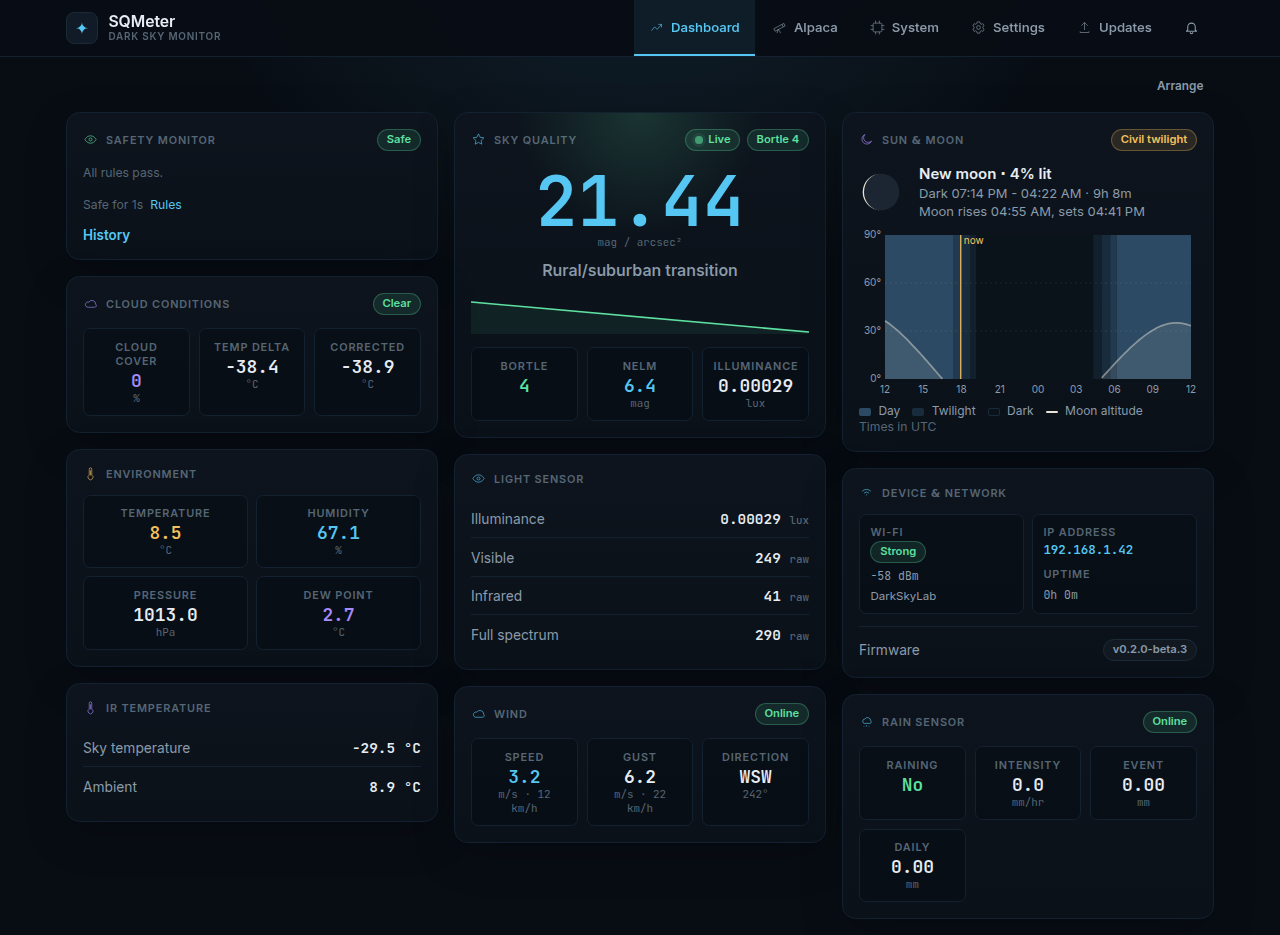
SQM (mag/arcsec²), NELM, and Bortle Scale 1–9 calculated from raw lux.
-
Web Interface
Real-time dashboard over WebSocket. No polling. No app required.
-
Environmental Sensors
Temperature, humidity, and pressure via BME280.
-
MQTT Publishing
Push readings to Home Assistant, Grafana, or any MQTT broker.
-
OTA Updates
Flash new firmware from the browser, or let the device update itself directly from GitHub Releases.
-
ASCOM Alpaca
Native SafetyMonitor + ObservingConditions device for N.I.N.A. — no separate bridge required. Tested with ASCOM ConformU on every change.
-
Safety & alerts
Rain, wind, cloud, SQM, humidity and dew-point rules. Alerts via Pushover, ntfy, webhook, MQTT or a paired phone over Bluetooth — sent any time, or only while an imaging app is connected, and you're told if it goes quiet.
-
Rain & wind
Optional Hydreon RG-15 rain gauge and anemometer / wind vane.
-
Sun & Moon
Twilight, darkness and moon chart for the night ahead from your location.
-
Open Hardware
Standard I2C sensors. Runs on any ESP32 dev board.
Sensors
| Sensor | Measures | Interface |
|---|---|---|
| TSL2591 | Lux (full / visible / IR) | I2C 0x29 |
| BME280 | Temperature, humidity, pressure | I2C 0x76 |
| MLX90614 | IR cloud temperature | I2C 0x5A |
| GPS (optional) | Location & time | UART |
| RG-15 (optional) | Rain detection | UART |
Quick Start
New device? Go to Flashing Your Device — you only need a USB cable and the release binaries.
Already flashed? Go to First Boot to configure WiFi.